Style Chat: AI Outfit Maker
- 4.2
- Rating
- 50.00K
- Installs
- Free
- Price
 Analysis by App-foxy
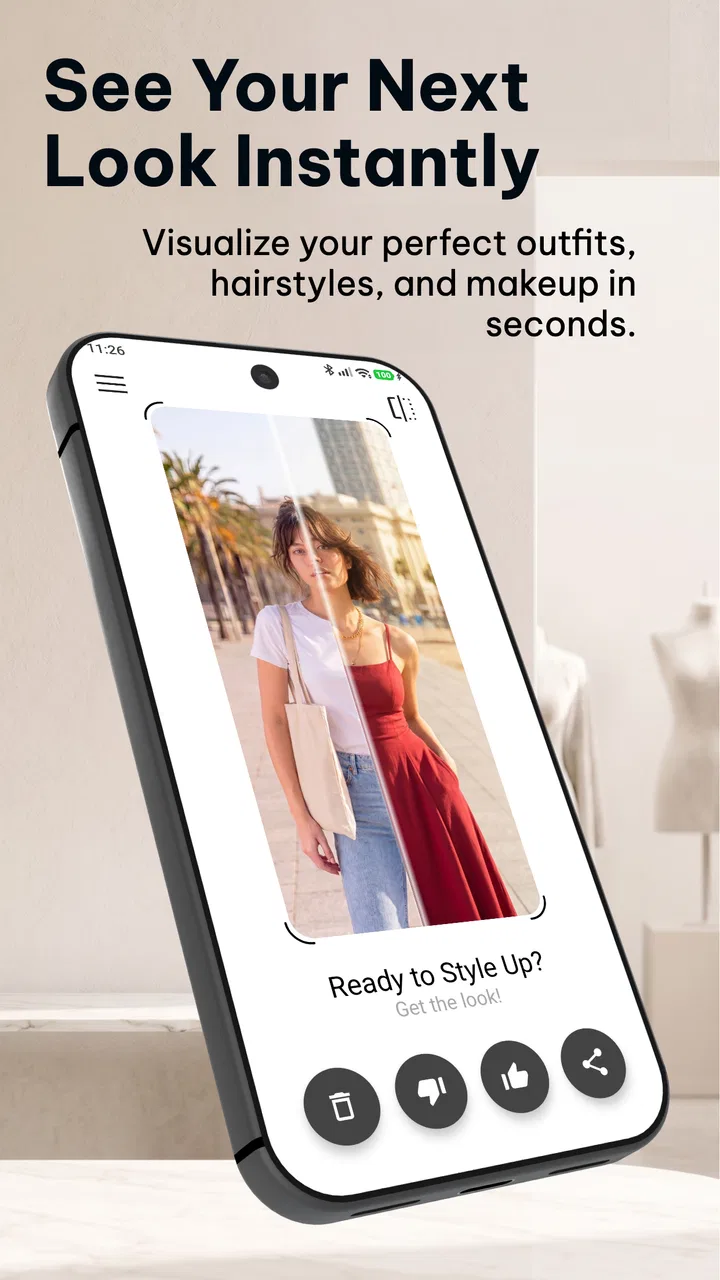
I approached Style Chat: AI Outfit Maker as a practical beauty tool rather than a simple dress-up toy. The idea is straightforward: use an AI stylist to explore clothing, hair, and makeup choices without changing in front of a mirror or ordering several items just to discover that they do not work together. In my experience, its value depends less on producing one magical makeover and more on how carefully you use the starting photo, the request, and the comparison process.
This is a free beauty app from dr-code.ai, aimed at Everyone, with a 4.2 average from around 80 ratings and over 10K installs. It runs on Android 11 or newer, and the current version is 0.1.0-231. Those details place it in an early stage, so I would treat it as a useful experiment and styling companion rather than a finished replacement for a professional stylist, fitting room, or makeup consultation.
From one photo to a usable styling routine
The best starting point is a clear, well-lit photo in which your body shape and current outfit are easy to see. I found that this matters more than writing a long, complicated request. If the image is dark, heavily cropped, or taken at an unusual angle, the result has less practical value because the app has fewer visual clues to work with. A simple front-facing image gives the AI a cleaner baseline for clothing changes and appearance suggestions.
You May Also Like

 Blood Strike: 2.5 Anniversary
Blood Strike’s Loadouts Turn Every Drop Into a Tactical Gamble
A close look at Blood Strike’s custom loadouts: how fast access to signature weapons reshapes its battle royale rhythm, rewards preparation, and narrows the gap between fights.

 Pandora - Music & Podcasts
Pandora’s Music Is Easy to Start, but Harder to Recover
Pandora’s strength is its low-effort path from a seed to a station. Its weak spot is how much confidence it asks you to place in connection, setup, and quiet recovery.

 8 Ball Pool
 Is Built on Rivalries, Rematches, and Routine
A close look at the rivalries, rematches, shared routines, and unanswered safety questions that turn a quick pool match into a persistent mobile community.

 Samsung Music
’s Quiet Strength Is Playing What You Already Own
Its reach comes less from spectacle than from dependable access to a personal library. That simplicity is both the app’s strongest retention engine and its ceiling.

 AccuWeather: Weather Radar
AccuWeather Review: A Quick, Clear Forecast for Everyday Decisions
For everyday plans, the best forecast is the one you can understand quickly. AccuWeather makes rain timing, radar, and local conditions easy to act on, with a few trade-offs.

 Hill Climb Racing
Why Hill Climb Racing Still Turns Crashes Into One More Run
A tiny car, a bumpy hill and one more upgrade: Hill Climb Racing keeps resurfacing because its simple chaos makes every near-miss feel personal.
More From Our News Desk
View All News


My usual workflow would be to begin with one goal instead of asking for everything at once. For example, I might start with a casual outfit for a warm day, then try a more polished version, and only afterward explore hair or makeup. This makes the changes easier to judge. When clothing, hairstyle, and cosmetics are altered together, it becomes difficult to know which part improved the overall look and which part simply distracted from it.
The chat-style approach is especially helpful when I already have a direction in mind but do not know the right fashion vocabulary. I can describe the occasion, the level of formality, and the mood I want, then refine the result in smaller steps. A request such as “make this suitable for a relaxed dinner without looking overdressed” is more useful than a vague command to make the image look better.
I also recommend keeping the first image as a reference. Instead of judging every generated look in isolation, compare it with the original and ask a practical question: would I actually wear this, or is it only visually interesting? That distinction is important with any virtual try-on tool. A dramatic result can be fun, while a quieter change in color, silhouette, or styling may be much more useful in everyday life.
A realistic scenario is preparing for a work event after hours. I could take a photo in a basic outfit, ask for a smart but comfortable alternative, and then test a softer makeup direction or a different hairstyle. The app can help me narrow down ideas before I search my wardrobe. It cannot tell me whether a fabric feels comfortable, whether shoes hurt after walking, or whether a jacket fits at the shoulders, but it can reduce the uncertainty around the overall combination.
How I keep the results useful instead of random
I get more from the app when I describe constraints that matter in real life. Mentioning a preferred level of coverage, a dislike of certain colors, a need for comfortable footwear, or the type of event gives the styling conversation a clearer purpose. I would not rely on a single broad prompt for a complete wardrobe decision. I would use the first result as a direction, then adjust one element at a time.
One useful habit is to separate inspiration from shopping. First, I explore shapes and combinations without thinking about specific brands. Once I know whether I prefer a relaxed jacket, a cleaner neckline, or a warmer color palette, I can look for similar pieces in my own closet or in shops. This prevents the AI image from turning into an unrealistic shopping list and makes the result easier to apply.
Another practical trick is to test the same basic outfit under different contexts. A look that works for a daytime meeting may need only a small change for an evening gathering. Reusing the same starting image helps me see whether the suggested changes are genuinely adaptable or whether the app keeps producing completely different styles. That repeatable comparison is more valuable than collecting dozens of unrelated transformations.
For hair and makeup, I prefer subtle requests first. Asking for a natural finish, a slightly different parting, or a polished but low-maintenance look gives me a better basis for deciding what suits my routine. A highly dramatic transformation may be entertaining, but it is less helpful if I have limited time in the morning or do not normally use strong makeup.
Settings and choices worth checking before you begin
The most important “setting” is the quality and suitability of the source image. I would check the lighting, background, pose, and visible clothing before starting. A busy background can make the result harder to read, while a pose that hides the waist, shoulders, or legs limits how clearly an outfit can be evaluated. A neutral setting is not essential for experimentation, but it makes comparisons easier.
I would also decide whether the goal is visual inspiration or a realistic preview. Those are not the same task. For inspiration, I can be adventurous with colors, hairstyles, and makeup. For a realistic preview, I should keep the request closer to my existing proportions, comfort preferences, and usual level of effort. The more ambitious the transformation, the more carefully I need to treat it as an idea rather than a prediction.
Because the app includes in-app purchases ranging from $0.49 to $34.99 per item, I would pay attention to any purchase prompt and consider whether the current experiment has already answered my question. The free entry point is useful for deciding whether the workflow suits me, but frequent experimentation can become less casual if I start unlocking individual items repeatedly. I would rather plan a small set of comparisons than generate endless variations without a clear purpose.
The age rating of Everyone makes the app approachable for a broad audience, but that does not remove the need for sensible photo habits. I would use images I am comfortable processing through an AI styling service and avoid including other people in the frame unless they have agreed. I would also crop out unrelated personal details where practical. These are simple precautions, especially when the image is being used for appearance experimentation rather than a private offline mirror.
The version number, 0.1.0-231, is another reason I would keep expectations measured. An early version can be perfectly useful for its central idea while still feeling less polished around edge cases. I would not build an important event plan entirely around one generated image. I would use the app to create options, then confirm the final choice with real clothes, real lighting, and a normal mirror.
Faster patterns for repeat users
Once I know what I want to investigate, I can make the process much faster by using a fixed sequence. My preferred pattern is: establish the occasion, choose the clothing direction, refine the color or silhouette, and only then add hair or makeup. This avoids spending time polishing a look whose outfit is still wrong for the situation.
A second pattern is to create a small “decision set” rather than asking for unlimited ideas. I might compare a relaxed option, a balanced option, and a more formal option. Three clearly different directions are easier to evaluate than ten minor variations. The point is not to find the most impressive image; it is to identify the version that matches my schedule, wardrobe, and comfort.
I would also reuse useful wording. If a request produces a promising result, I can retain the parts that worked and change only one instruction. For example, I might keep the same level of formality and color family while changing the jacket shape. This makes the conversation more like controlled testing and less like starting over each time. It is a small habit, but it helps reveal whether a preference is consistent.
For wardrobe planning, I would photograph a few dependable pieces separately or use an outfit that represents them accurately, then ask for combinations around that starting point. The app is more useful when it helps me work with what I own than when it constantly invents clothing I cannot find. I would still verify the suggestions physically because virtual fabric, fit, and texture can look convincing without behaving like the real garment.
There is also a useful distinction between “change” and “recommend.” If I want to see how a different hairstyle affects an existing outfit, I should keep the clothing request stable. If I want broader advice, I can ask for a complete style direction. Mixing both objectives in every request may produce attractive images, but it makes the results harder to compare and less helpful for making a specific decision.
People who use the app regularly should keep a simple personal rule for stopping. Once two or three options clearly fit the occasion, more generations may add noise rather than insight. I find that the strongest workflow ends with a real-world check: try the closest clothing combination, stand in normal lighting, and consider movement, weather, and maintenance. AI styling is best at opening possibilities, not closing the decision for me.
Where the virtual preview reaches its limits
The central limitation is that an image is not the same as a fitting. The app can help me imagine an outfit, but it cannot replace the feel of fabric, the accuracy of sizing, or the way a garment moves when I sit, walk, or raise my arms. This matters most for tailored clothing, fitted trousers, structured jackets, and anything where shoulder or waist placement determines comfort.
Hair and makeup previews have similar limits. A generated look can suggest a direction, but it does not tell me how long the hairstyle will take, whether a product works with my skin, or whether the finish remains comfortable throughout the day. I would treat makeup results as mood-board guidance rather than a guarantee of how a particular shade or technique will appear in person.
Another trade-off is realism versus creativity. The more I ask for a major transformation, the more likely I am to receive something that is visually polished but difficult to reproduce. That is not necessarily a flaw; creative exploration is part of the appeal. The mistake would be treating an imaginative result as a precise forecast of my appearance after buying similar items.
I would also skip this app if I need expert help with a complex personal styling issue. Someone preparing for a formal event with strict dress requirements, dealing with a specialized fit problem, or seeking professional color analysis may be better served by a human consultant or an in-person fitting. Likewise, if I only want a basic wardrobe checklist, a conventional notes app and a mirror may be faster and less distracting.
Compared with ordinary fashion browsing, this tool has the advantage of putting ideas onto my own image instead of asking me to imagine them from a model’s photograph. Compared with a physical fitting room, it is quicker and more flexible, but much less reliable for size and comfort. Compared with a professional stylist, it is inexpensive to try and available whenever I have time, while lacking the human ability to notice lifestyle details that I forgot to mention.
The purchase model is worth considering in that comparison. The app is free to start, which lowers the barrier for experimenting, but the listed per-item purchase range means I would not assume that every deeper styling session remains cost-free. For someone who wants occasional inspiration, that may be acceptable. For someone who plans to test many outfits every week, the total cost and the time spent comparing results deserve attention.
Who will get the most from Style Chat
I think the strongest audience is someone who enjoys visual experimentation but wants more personal context than a standard inspiration board provides. It can be helpful before shopping, while planning an event, when trying to refresh a familiar wardrobe, or when deciding whether a change in hair or makeup would alter the balance of an outfit.
It is also a good fit for people who struggle to describe what they like. The chat format lets me begin with everyday language and refine the idea through examples. Seeing a possible direction can make it easier to explain a preference later to a friend, stylist, barber, or makeup artist.
I would be more cautious if I were looking for exact product matching, guaranteed body-accurate fitting, or a complete personal color diagnosis. The app can support those decisions, but it should not be the only evidence. Real garments, reliable measurements, and personal comfort remain more important than a flattering generated image.
New users should start with a modest test: one clear photo, one occasion, and one styling change. That reveals whether the visual output feels relevant before they spend time exploring more elaborate combinations. Experienced users can then build repeatable habits around controlled comparisons, realistic constraints, and a final mirror check.
My verdict after using it as a styling companion
Style Chat: AI Outfit Maker is most convincing when I use it as a fast visual conversation, not as an authority on what I should wear. Its combination of outfit changes, hair ideas, and makeup exploration gives it more range than a basic outfit collage, while the chat approach makes refinement feel natural. The strongest results come from a good source photo, a specific purpose, and the discipline to change one variable at a time.
I like that the app can turn an uncertain thought into something concrete. Instead of wondering whether a different silhouette or beauty direction might suit me, I can explore the idea before buying anything or committing to a major change. That makes it especially useful for planning and confidence-building, even when the final decision still happens offline.
At the same time, the early version and image-based nature mean I would keep a healthy distance from its most polished results. It cannot verify fit, comfort, fabric, maintenance, or how a look behaves in ordinary life. The free starting point is appealing, but I would watch the in-app purchase prompts and avoid generating variations without a clear question to answer.
My recommendation is simple: try it if you want personalized visual inspiration and are willing to treat the output as a draft. Use it before shopping, before an event, or when you need help translating a vague style idea into a few visible options. Skip it if you need precise fitting advice or professional beauty guidance. Used with that distinction in mind, this small app from dr-code.ai can become a practical part of a styling routine rather than just another collection of novelty makeovers.
FAQs for Style Chat: AI Outfit Maker
01What is Style Chat: AI Outfit Maker?
Style Chat: AI Outfit Maker is an innovative app designed to help users create stylish outfits using artificial intelligence. It provides personalized fashion recommendations based on your preferences and wardrobe, making it easier to plan daily outfits or find inspiration for special occasions.
02How does the AI feature work in Style Chat?
The AI in Style Chat analyzes your wardrobe and preferences to generate outfit suggestions. It learns from your feedback to improve its recommendations over time. By understanding your style, it offers personalized combinations, ensuring you always look your best without the hassle of manual selection.
03Is Style Chat user-friendly for beginners?
Yes, Style Chat is user-friendly and designed with a simple interface that caters to both fashion enthusiasts and beginners. The app guides users through setup and outfit creation, providing tips and explanations along the way, making it accessible for those new to fashion apps.
04Does Style Chat require an internet connection?
Style Chat primarily functions offline, allowing you to access your wardrobe and past recommendations anytime. However, an internet connection is necessary for initial setup, downloading updates, and accessing certain features like new fashion trends and AI improvements.
05Can I integrate my existing wardrobe with Style Chat?
Absolutely! Style Chat allows you to upload your existing wardrobe by taking pictures or selecting items from a pre-set catalog. This integration helps the AI provide accurate and personalized outfit suggestions, enhancing your overall user experience.
Pros
- Generates stylish outfit suggestions.
- User-friendly interface and navigation.
- Wide range of clothing styles covered.
- AI learns and adapts to preferences.
- Saves time on daily outfit decisions.
Cons
- Limited free features without subscription.
- Occasional delays in AI response.
- Requires internet connection for full use.
- Some style suggestions may repeat.
- In-app ads can be distracting.

Style Chat: AI Outfit Maker
Gallery